AI Drawing Coach: How Photo Feedback Helps You Learn to Draw
What an AI drawing coach is, how it checks a photo of your pencil drawing, what feedback it gives, and where it helps beginners most.
By Ayoub Farid · · 4 min read
Most people who try to learn drawing on their own hit the same wall: they can follow a tutorial, but they can't tell what's wrong with their own drawing. The sphere looks flat, the eye looks "off", and nobody is there to say why.
That's the gap an AI drawing coach fills. You draw on real paper, take a photo, and get specific feedback on that exact drawing: what's working, and what to change with your pencil next time.
What an AI drawing coach actually does
A good drawing coach, human or AI, does three things:
- Looks at your drawing, not a generic example.
- Compares it to a clear goal for that exercise ("five boxes, evenly stepped from white to black").
- Gives you one or two actions you can do with a pencil, instead of vague advice like "practice more".
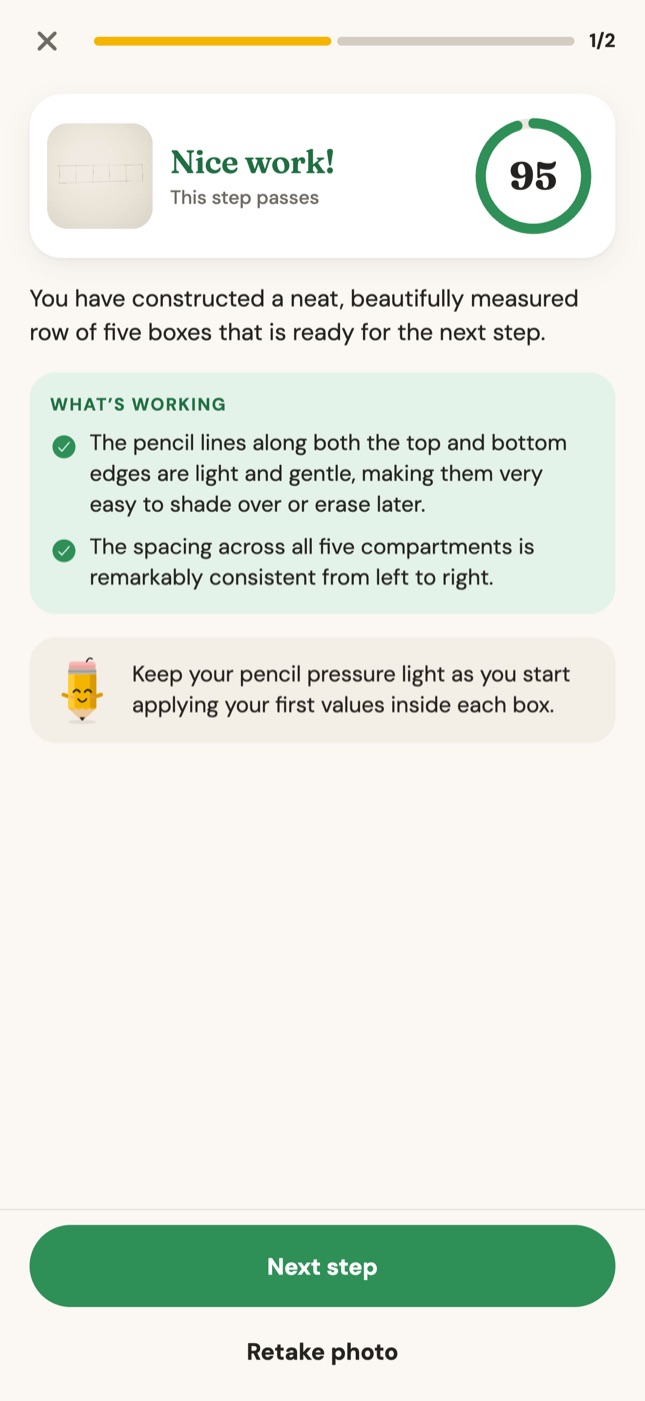
In Graphite, each lesson step has its own checklist. When you photograph the step, the coach checks the drawing against that list and returns:
- a score out of 100 (60 or more passes the step)
- what's working, so you keep doing it
- up to two fixes, each written as problem → what to do
- a short tip for the next step
Why "what to fix" beats "good job"
Beginners don't need more praise or more criticism. They need precise, small corrections. Compare:
| Vague feedback | Coach feedback |
|---|---|
| "The shading needs work." | "The darkest band sits right on the edge. Move it inside the shadow side, about a finger's width from the edge." |
| "Proportions are off." | "Box two and box four are wider than one and three. Mark five equal widths with light ticks first." |
| "Make it more realistic." | "Leave the highlight as white paper. Erase back to white near the top left." |
Each fix is something you can do in the next five minutes. That's what makes the next attempt better.
It only judges what you've learned so far
A common problem with general AI critique is that it comments on everything at once. If you're on step one of a sphere (draw a light circle), you don't want notes about your shading.
Graphite's coach has an "ignore for now" list for every step. While you're drawing the outline, it won't nag you about values. While you're mapping the shadow, it won't grade your blending. This keeps feedback focused on the one skill you're practicing, the way a patient teacher would.
Where an AI coach helps most
- Values and shading. Is the core shadow in the right place? Is the highlight still white? Is there a cast shadow? These are concrete and easy to check from a photo. See how to shade a sphere.
- Proportions of simple shapes. Equal boxes, round circles, eye lids that overlap the iris. See how to draw an eye.
- Consistency. It checks every attempt the same way, at any time of day, so you can practice ten minutes before work.
What it can't do
Be honest with yourself about the limits:
- It sees a photo, not your paper. A blurry, angled or dark photo gives worse feedback. Learn how to photograph your drawing.
- It's built for the exercise you're on. It isn't a replacement for an art teacher who discusses your personal style and long-term goals.
- It can't feel your pencil pressure. It infers it from the marks on paper.
For a deeper look, read what AI art feedback can and can't do.
How a session in Graphite works
- Open today's lesson, for example Shaded sphere (15 minutes, 4 steps).
- Read the step: "Draw a circle about the size of your palm with light, loose strokes."
- Draw it on paper with any pencil.
- Photograph it from straight above.
- Read your score, what's working and the fix. Retake the photo after fixing, or move on.
The guide always shows the current step in orange, so you know exactly what to add.
Frequently asked questions
Is an AI drawing coach good for complete beginners?
Yes, beginners benefit the most, because their mistakes are common and easy to name: dark outlines, missing highlights, shadows in the wrong place. Clear fixes for those make a visible difference quickly.
Do I draw on the screen?
No. In Graphite you draw on real paper with a real pencil and only use the phone to see the step and take the photo. Only the warm-up drills are done on screen.
Will an AI coach make my drawings look the same as everyone's?
No. It checks fundamentals like value, light and proportion, which every style relies on. How you use them is up to you.